Domain registered elsewhere? How to point it to LJPc hosting
Published on November 9, 2026 13 min read
Domain with another registrar? Add the A, www, MX and SPF records for LJPc hosting, read the DNS check in Plesk and get free SSL automatically.

If your domain is registered with another provider and your website or email is hosted at LJPc, you can point the domain to us in one of two ways. Either you change the nameservers at your provider to ns1.ljpc.network, ns2.ljpc.network and ns3.ljpc.network, or you keep the DNS where it is and add a few records that point to your hosting plan. The DNS check in Plesk shows the exact values for your domain. As soon as your domain and www point to your hosting plan, our system requests a free SSL certificate for you.
This guide covers which option suits you, which DNS records to add at your registrar or DNS host, how to read the DNS check, why a certificate can take a while and how to see whether a domain still points to LJPc.
Two ways to point your domain to LJPc hosting
With both options your domain stays registered with your current provider. The difference is who manages the DNS: the set of records that decides where your website and email go.
| Use the LJPc nameservers | Keep DNS at your provider | |
|---|---|---|
| What you change at your provider | Replace the nameservers with ns1.ljpc.network, ns2.ljpc.network and ns3.ljpc.network. | Edit the records for your website and email. The nameservers stay the same. |
| Who manages the DNS | LJPc. From then on you edit records in Plesk. | Your provider. You edit records in their control panel. |
| What is already in place | Every record for your website and email, including SPF, DKIM, DMARC and CAA. | You add the records yourself, using the values from the DNS check. |
| Best when | you want everything in one place. | other services at your provider rely on the domain, or your IT partner manages the DNS. |
To switch to the LJPc nameservers, follow the steps in change your nameservers. If you also transfer the registration to us, the nameservers point to LJPc automatically once the transfer completes, see transfer your domain to LJPc. The rest of this guide covers the second option, where the DNS stays with your provider.
Which DNS records do you need?
A website and email at LJPc always need the same kinds of records. The IP addresses depend on your server and the DKIM key is unique to each domain, so copy those from the DNS check of your own domain. The table uses example values.
| Type | Name | Value | Used for |
|---|---|---|---|
| A | @ | Your server's IPv4 address, for example 192.0.2.10 | Your website |
| AAAA | @ | Your server's IPv6 address, for example 2001:db8::10, if the DNS check shows an AAAA row | Your website over IPv6 |
| CNAME | www | yourdomain.com, or an A and AAAA record with the same addresses as your domain | www.yourdomain.com |
| MX | @ | mx1.ljpc.email and mx2.ljpc.email, both with priority 10 | Incoming email |
| TXT (SPF) | @ | v=spf1 include:_spf.ljpc.network -all | Outgoing email |
| TXT (DKIM) | default._domainkey | The key from the DNS check, starting with v=DKIM1; | Signing your email |
| TXT (DMARC) | _dmarc | v=DMARC1; p=quarantine | Policy for email that fails the checks |
| CNAME | autodiscover | autodiscover.ljpc.email | Email apps find your settings automatically |
| CNAME | autoconfig | autoconfig.ljpc.email | The same, for apps such as Thunderbird |
Keep these points in mind:
- The name field.
@means the domain itself. Some providers want an empty field or the full domain name instead. For the other records, enter only the part before your domain, sowwwrather thanwww.yourdomain.com. - One address per name. Replace the A, AAAA and www records of your previous host instead of adding new ones next to them. With two addresses on the same name, some visitors end up on the old server. Also turn off any forwarding or parking page your provider has on the domain.
- No AAAA row in the DNS check? Then delete any AAAA record at your provider. Otherwise IPv6 visitors still reach your old host and the certificate cannot be issued.
- One SPF record. If you already have an SPF record, add
include:_spf.ljpc.networkto it. It tells receiving servers that our mail servers may send email for your domain. Without it, your email may be rejected or end up in spam. How to combine several includes is explained in adding DNS records from an email or marketing service. - The DKIM key. Copy it from the DNS check and paste it in one go, without quotation marks around it. Every character counts.
- DMARC. If
_dmarcalready has a record, keep it rather than adding a second one. The options are explained in what is DMARC? - TTL. Keep the default. Lowering the TTL of your existing records to 15 minutes a day in advance, if your provider allows it, makes the switch faster.
If you use the premium spam filter, use the MX value from that article. Records for other services, such as a newsletter tool or a verification code, stay next to these records.
Only your website or only your email at LJPc?
- Website only: add the A, AAAA and www records, and keep the MX and mail records of your email provider. If your website sends email from your own domain, for example from a contact form, also add
include:_spf.ljpc.networkto your SPF record and add the DKIM record. - Email only: add the MX, SPF, DKIM and DMARC records and the two CNAME records for email apps, and keep the records of your website.
In your email app the server is always ljpc.email, wherever your DNS is hosted. All settings are in set up email on your phone and computer.
Open the DNS check in Plesk
The DNS check compares your domain's records with what your hosting plan expects. It works as soon as your site exists in Plesk, so you can pass the values to your provider or IT partner before the website goes live.
- Log in to the customer portal, choose Sites in the Services menu and click your site.
- In the Site overview block, click Log in to Plesk. Plesk opens in a new tab without a separate password, see open Plesk from the customer portal.
- You land on Websites & Domains. Click the Hosting & DNS tab of your domain.
- Click DNS check. The check starts by itself and finishes within a few seconds.
How to read the DNS check
At the top is a banner about your nameservers, below it a table with one row per record.
The nameserver banner
- Nameservers are correctly pointing to ns1/ns2/ns3.ljpc.network (green): LJPc manages your domain's DNS.
- Nameservers are not pointing to us, followed by the current nameservers and Change to: ns1.ljpc.network, ns2.ljpc.network, ns3.ljpc.network: your domain's DNS is hosted elsewhere. If you chose to keep DNS at your provider, that is fine and only the table matters. The banner says nothing about where the domain is registered.
The table
| Column | What it shows |
|---|---|
| Record | The record being checked, for example yourdomain.com (A), www.yourdomain.com (A), yourdomain.com (MX), yourdomain.com (SPF) and yourdomain.com (DKIM). An AAAA row only appears if your server has an IPv6 address. |
| Expected | The value your hosting plan expects. Click a value to copy it; you briefly see Copied to clipboard. |
| Authoritative NS | The answer from your domain's own nameserver, the source of your DNS. |
| CloudFlare and Google | The answer from the public resolvers 1.1.1.1 and 8.8.8.8, which many visitors use. |
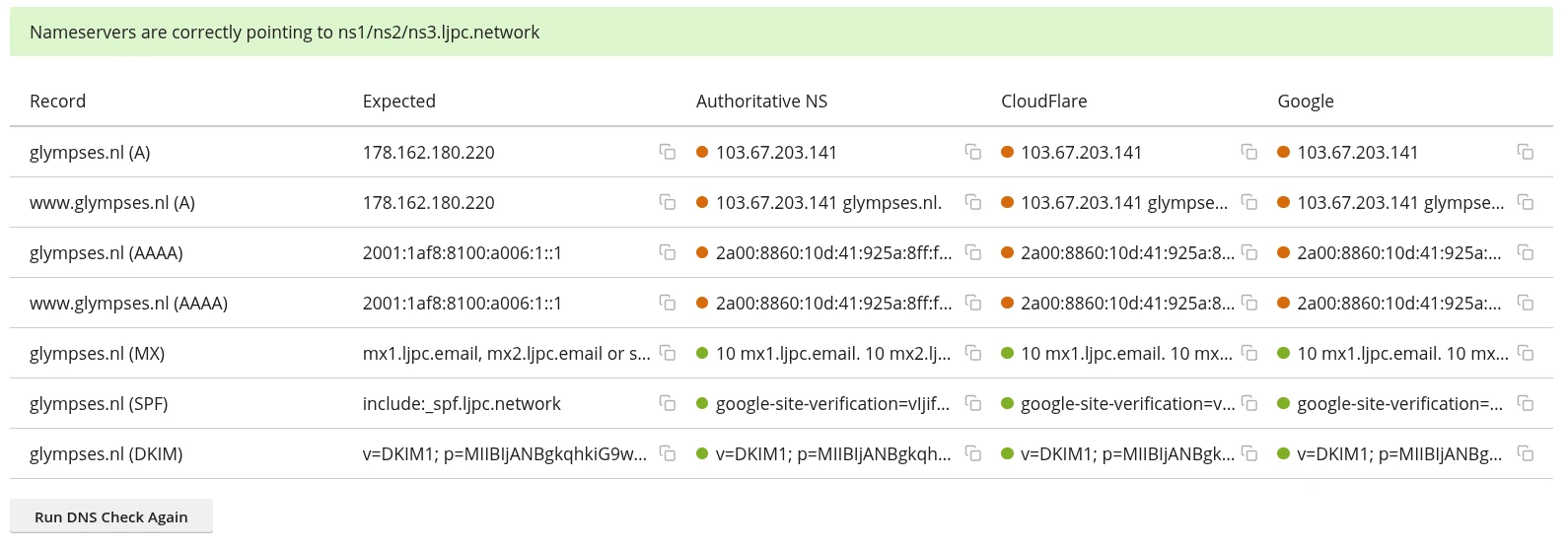
Every cell gets a coloured dot:
- Green: the answer contains the expected value.
- Orange: the answer is different, or there is no record (No records found).
- Red: the DNS server did not answer (Query timeout or failed). Wait a minute and click Run DNS Check Again at the bottom.
Read the columns together:
- Green under Authoritative NS, orange under CloudFlare or Google: the record is correct and on its way. Public resolvers keep the old answer until its TTL expires.
- Orange in all three columns: the record at your provider is not right yet. Compare the answer with the Expected column.
- Not sure about DKIM? Send a test email from your address to an address at another provider and view the original message source. If it shows
dkim=passfor your domain, the record is correct.
When do you get the SSL certificate?
Your hosting plan includes a free Let's Encrypt certificate, and our system requests it for you. Every 15 minutes it checks whether your domain and www.yourdomain.com point only to your hosting plan with their A record and, if present, their AAAA record. It checks this at Google, at Cloudflare and at your domain's nameserver: the same three columns as in the DNS check. Once they are correct for both the domain and www, you usually have a certificate for both within an hour.
| What you see | Cause | What to do |
|---|---|---|
The row www.yourdomain.com (A) is orange | The www record is missing or still points to your previous host. | Set www as a CNAME to your domain or give it the same addresses. You do not need a wildcard certificate for this: the certificate covers your domain and www. |
| A column shows two addresses | An old A or AAAA record is still there next to the new one. | Delete the old record at your provider. |
| No AAAA row in the check, but an AAAA record at your provider | That AAAA record still points to your previous host. | Delete the AAAA record. |
| Green under Authoritative NS, orange under CloudFlare or Google | The change is still propagating. | Wait for the TTL to expire. Our system tries again every 15 minutes. |
| Unknown addresses everywhere while your DNS is at Cloudflare | The Cloudflare proxy is on (orange cloud, Proxied). | Set the records for your domain and www to DNS only so they point straight to your hosting plan. |
| All green but still no certificate | A CAA record at your provider does not allow Let's Encrypt. | Add 0 issue "letsencrypt.org" to your CAA records. |
| You already had a certificate without www | Our system only requests a certificate when there is no valid one yet. | Request it again in Plesk with the www option ticked. |
To get the certificate straight away, request it yourself in Plesk. The steps are in Let's Encrypt: set up your free SSL certificate.
Where do you edit records later?
Always at the party behind your nameservers. Even when your DNS is hosted at your provider, your domain has its own DNS zone in Plesk. The DNS check takes its expected values from that zone, but visitors only use it once your domain uses the LJPc nameservers. So make changes for your website or email at your provider. How to manage records in Plesk and in the portal once you use the LJPc nameservers is covered in manage DNS records.
Moving to the LJPc nameservers later
You can switch at any time. If your domain does not use the LJPc nameservers, our system removes its zone from our nameservers after a few days. Plesk then shows the Trigger DNS zone sync tile on the Hosting & DNS tab instead of DNS zone synced. To switch without downtime:
- Check the records in Plesk under DNS. First copy over any records for other services that you added at your provider.
- On the Hosting & DNS tab, click Trigger DNS zone sync. You see DNS zone sync triggered successfully and within a few minutes the zone is back on our nameservers.
- Within a week, change the nameservers at your provider to
ns1.ljpc.network,ns2.ljpc.networkandns3.ljpc.network.
If you skip step 2, our system restores the zone by itself after the switch, but your domain may be unreachable until then. More about the switch and DNSSEC is in change your nameservers.
Does your domain still point to LJPc?
The same DNS check shows whether a website or mailbox has moved to another host, for example before you cancel a hosting plan nobody uses any more:
- If the A, AAAA and www rows are orange with a different address in all three columns, your website runs elsewhere.
- If the MX row is orange with other mail servers, your email arrives elsewhere.
- If everything is orange, nothing points to your hosting plan any more.
The Nameservers are not pointing to us banner on its own does not tell you this: a domain with DNS elsewhere can still point to LJPc. To stop a plan, see cancel a subscription.
How long does it take?
How quickly a change reaches your domain's nameserver depends on your provider; the Authoritative NS column shows whether it is there. Public resolvers such as Google and Cloudflare keep the old answer until its TTL expires, often an hour and sometimes a day. When you change nameservers, allow a few hours and sometimes up to 48 hours. See DNS propagation for how this works.
Need a hand? Create a support ticket and include your domain name. We tell you exactly which values belong where; the change itself is made at your provider, by you or by whoever manages the domain there.
Frequently asked questions
Can I share the DNS records before my website goes live?
Yes. The DNS check in Plesk shows the values as soon as your site exists in your hosting plan. Visitors only reach LJPc once the records at your provider are changed, so make that change when you want to go live.
Do I need a wildcard certificate to make www work?
No. The free certificate covers your domain and www. If www does not work, the www record at your provider is wrong. The DNS check shows this in the www.yourdomain.com (A) row.
What does Nameservers are not pointing to us mean in the DNS check?
Your domain's DNS is hosted by another party. It says nothing about where the domain is registered, or whether your website still runs at LJPc: the rows in the table tell you that.
Why is there no SSL certificate yet when my records are correct?
Our system requests it once your domain and www point only to your hosting plan at Google, Cloudflare and your domain's nameserver. Often an old AAAA record or a second A record is still there, or the change is still propagating. You can also request the certificate yourself in Plesk.
Are the DNS records the same for every domain?
The email records are the same for every domain, except the DKIM key, which is unique per domain. The IP addresses depend on the server of your hosting plan, so always copy them from the DNS check of that domain.
Can LJPc change the records at my provider?
Records at another provider are changed by you or by whoever manages the domain there. If you want us to handle the DNS, set your nameservers to ns1.ljpc.network, ns2.ljpc.network and ns3.ljpc.network, or transfer the domain to LJPc.