Emergency support after hours: how to reach LJPc hosting fast
Published on November 9, 2026 5 min read
Website down outside business hours? Make an emergency call to LJPc hosting with your emergency code by phone, or use the form in the customer portal.

Is your website or web shop completely down outside business hours, and can it not wait until the next working day? Then make an emergency call. Call +31 85 130 6429, press 1 for an emergency and enter your personal emergency code, or fill in the emergency form in the customer portal. An LJPc engineer is alerted right away and calls you back within 15 minutes.
When should you make an emergency call?
Our business hours are Monday to Friday, 09:00 to 17:00 Dutch time (CET/CEST). Outside those hours, so in the evening, at night, at weekends and on public holidays, the emergency call is there for problems that cannot wait until the next working day, such as a website or web shop that is completely unreachable.
Anything that can wait until the next working day goes through a support ticket, a WhatsApp message or an email. That keeps the emergency line free for the customers who need it at that moment. Typical questions for the regular route:
- a question about an invoice or your subscription;
- a new mailbox, an extra domain or a change to your website;
- a question about how something works in the portal or in Plesk.
During business hours, call the same number or create a ticket. How that works and how fast we reply is explained in how to create a support ticket.
First check that your website is really down
Sometimes a website only looks down because your own network has lost access. Turn off Wi-Fi on your phone and open your website over mobile data. If it loads there, the IP address of your network has probably been blocked, for example after a few wrong passwords. You can fix that yourself with unblock your IP address. The system status page shows whether we have an outage. More checks are in is LJPc hosting down?
Where do you find your emergency code?
Your emergency code is a personal five-digit code. When you make an emergency call by phone, it tells us right away who is calling. To find it:
- Log in to the customer portal. See log in to the customer portal if you need help.
- In the top menu, click Support and choose the red Emergency Call.
- Your code is shown at the top of the page, under Your emergency code.
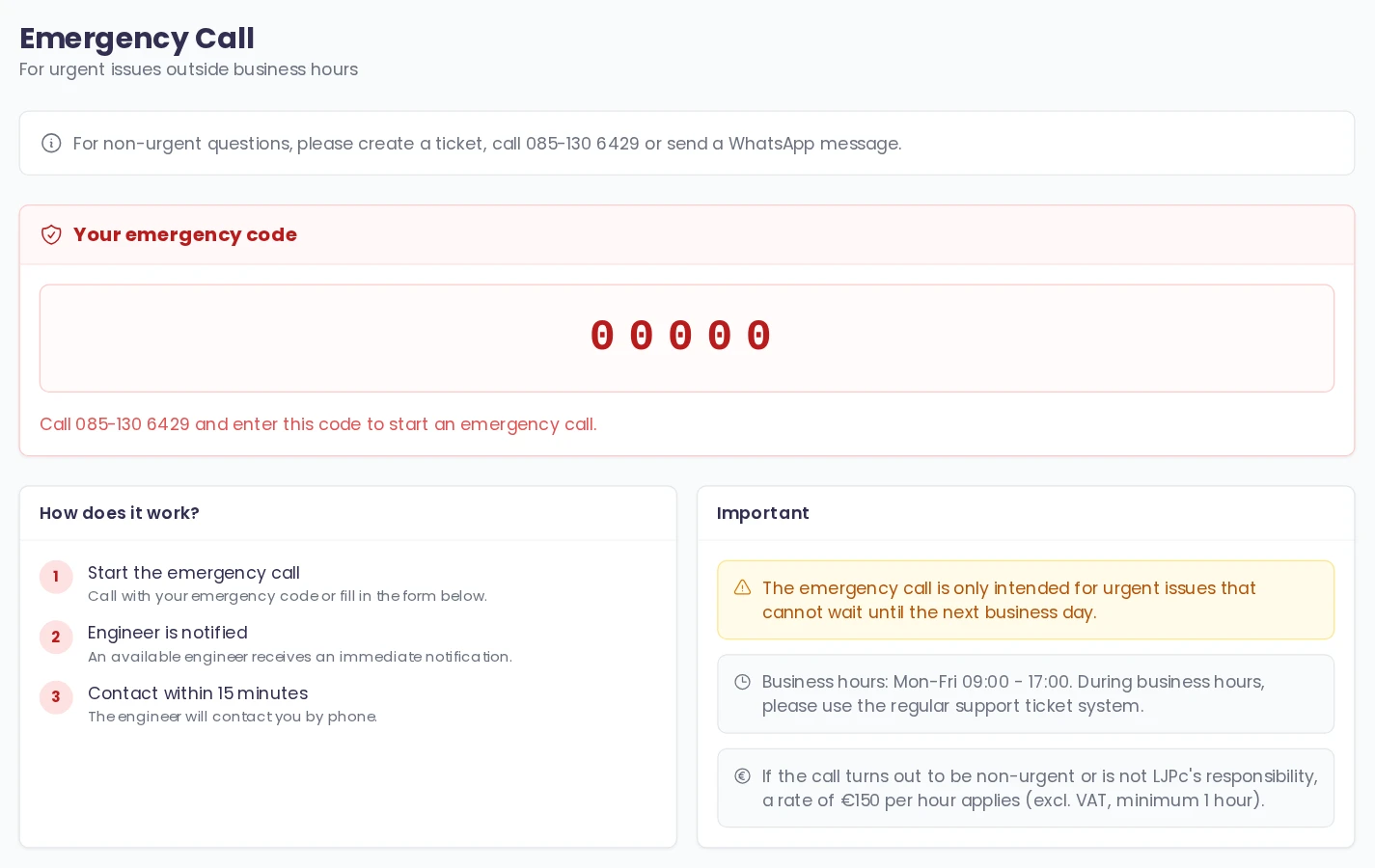
Everyone with their own login has their own emergency code: the main account and every sub-account that is allowed to use the emergency call. That way we know who is calling on every call.
Tip: save your emergency code in your phone now, next to our number +31 85 130 6429. Then you have it at hand when you are on the road or cannot log in.
No Emergency Call in the menu? If you use a sub-account, ask the main account holder to give you the emergency call permission. See sub-accounts in the customer portal. If you have the main account yourself, contact us during business hours.
Make an emergency call by phone
The phone menu is in Dutch. Here is what you hear and what to do:
- Call +31 85 130 6429 (085 130 6429 from within the Netherlands). Call from the number we can reach you on, with caller ID switched on.
- Outside business hours you hear a welcome and our opening hours, followed by "Is er sprake van een noodgeval? Druk dan op 1" (is this an emergency? Then press 1). Press 1 straight away; the menu only waits a few seconds.
- You hear that a call that is not urgent costs 150 euros, followed by "Vul je noodoproep code in" (enter your emergency code).
- Enter the five digits of your emergency code and finish with the hash key (#).
- If the code is correct, you hear "We hebben de noodoproep ontvangen" (we have received your emergency call) and the call ends. An engineer is alerted right away and calls you within 15 minutes.
If the code is not recognised, you hear that the code is unknown and you can leave a voicemail message. A voicemail message is not an emergency call. Check your code in the portal and call again, or use the form below.
Make an emergency call in the portal
Can you not call, or do you want to describe the problem in detail right away? Then start the emergency call with the form in the portal.
- In the portal, go to Support and then Emergency Call, and scroll down to Emergency call via form.
- Tick the three statements. Each statement appears once you have ticked the one before:
- I have tried all regular contact methods;
- I understand this is only for emergency calls;
- I agree to the hourly rate of 150 euros, excluding VAT, if this call turns out to be non-urgent or is not LJPc's responsibility.
- Describe the problem in the field Describe the problem. Say which website or domain it is about, what you see (with the exact error message), since when it has been happening and what changed right before. Add the phone number we can reach you on right now.
- Click Send emergency call. You see Emergency call sent, and an engineer will contact you by phone.
What does an emergency call cost?
| Situation | Cost |
|---|---|
| The problem is urgent and on our side | No charge: support is free when something goes wrong on our side |
| The call turns out to be non-urgent | 150 euros per hour, excluding VAT, with a minimum of one hour |
| The problem is not LJPc's responsibility | 150 euros per hour, excluding VAT, with a minimum of one hour |
If you have an SLA with us, the terms of your SLA apply. What support costs during business hours is explained in how to create a support ticket.
What happens after your emergency call?
As soon as your emergency call comes in, an available engineer is alerted. We call you within 15 minutes. Keep your phone at hand and have this information ready, so we can get to work straight away:
- which website, domain or email address it is about;
- what you see, with the exact error message or a screenshot;
- since when it has been happening and what changed right before, such as an update or a change to your website or DNS;
- whether it works on another network, such as mobile data.
Not urgent? How to reach us outside business hours
If your question can wait until the next working day, you can use:
- a support ticket in the customer portal, with all details and attachments in one place;
- a WhatsApp message to +31 85 130 6429;
- an email to support@ljpc.nl;
- a voicemail message when you call +31 85 130 6429 and do not press 1.
All contact details and opening hours are on our contact page.
Frequently asked questions
What are the business hours of LJPc hosting?
Monday to Friday, 09:00 to 17:00 Dutch time (CET/CEST). Outside those hours, at weekends and on public holidays you can make an emergency call for a problem that cannot wait until the next working day.
Is an emergency call free of charge?
Yes, if the problem is urgent and on our side. If the call turns out to be non-urgent or the problem is not LJPc's responsibility, we charge 150 euros per hour, excluding VAT, with a minimum of one hour. With an SLA, the terms of your SLA apply.
Where do I find my emergency code?
In the customer portal under Support, Emergency Call. Your personal five-digit code is at the top of the page. Save it in your phone next to our number +31 85 130 6429.
Does every colleague have their own emergency code?
Yes. The main account and every sub-account that is allowed to use the emergency call has its own code, so we know who is calling. The main account holder gives a sub-account the emergency call permission.
How fast will I be called back after an emergency call?
An available engineer is alerted right away and calls you within 15 minutes. Keep your phone at hand.
Is the phone menu available in English?
The phone menu is in Dutch. Outside business hours, press 1 when you hear "Is er sprake van een noodgeval? Druk dan op 1", then enter your five-digit code and finish with the hash key. You can also use the form in the customer portal, which is available in English.