Enable DNSSEC for a domain registered with another registrar
Published on November 22, 2026 6 min read
Domain at another registrar on the LJPc nameservers? Switch DNSSEC on in the customer portal, add the DS record at your registrar and follow the status.

If your domain is registered with another registrar and uses the LJPc nameservers, you switch DNSSEC on in the customer portal and then enter the DS record at your registrar yourself. We sign your zone, show you exactly what to enter and check whether the record is at the registry. This article covers the steps, what the statuses in the portal mean and the order in which you switch DNSSEC off again.
Which domains is this for?
This article is for a domain you registered with another party that points to the LJPc nameservers: ns1.ljpc.network, ns2.ljpc.network and ns3.ljpc.network. The registrar is the party you pay for the registration. Not sure who that is? Read who manages your domain.
If your domain is registered with LJPc, DNSSEC comes on by itself and we place the DS record. The page of your domain in the portal shows the status and lets you switch it off and on. What DNSSEC does and how the chain of trust works is explained in what is DNSSEC.
If another party also manages your DNS, switch DNSSEC on at that party. LJPc only signs zones on its own nameservers.
Step 1: switch DNSSEC on in the customer portal
Log in at portal.ljpc.nl, choose Sites in the Services menu and open your site. Below Linked domains you find the DNSSEC card with the status Off. Click Switch DNSSEC on.
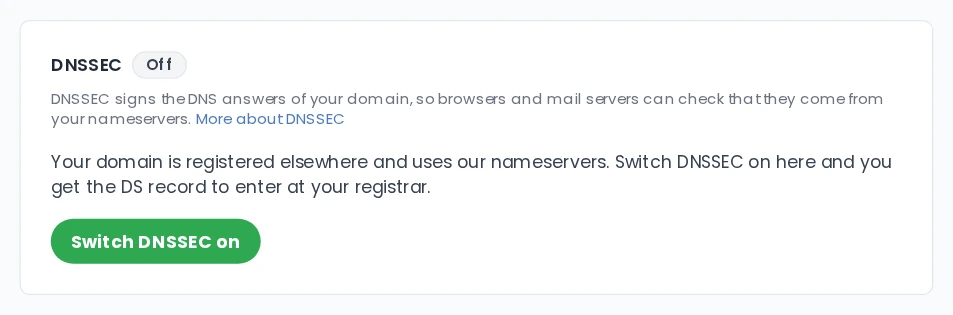
The status changes to Switching on. Our nameservers create the keys and sign your zone. Within a few minutes the DS record appears on the card and you receive it by mail as well. Your website and email work as usual in the meantime, because without a DS record no resolver checks the signatures yet.
No card? Then your domain does not use the LJPc nameservers yet, or it is a subdomain. A DS record belongs to a domain you register at a registry, such as yourdomain.nl. For shop.yourdomain.nl that place does not exist.
Step 2: enter the DS record at your registrar
The card now has the status Waiting for DS record and shows four values, each with a Copy button:
- Key tag: the number of the key.
- Algorithm: 13 (ECDSA P-256 SHA-256).
- Digest type: 2 (SHA-256).
- Digest: a string of 64 characters.
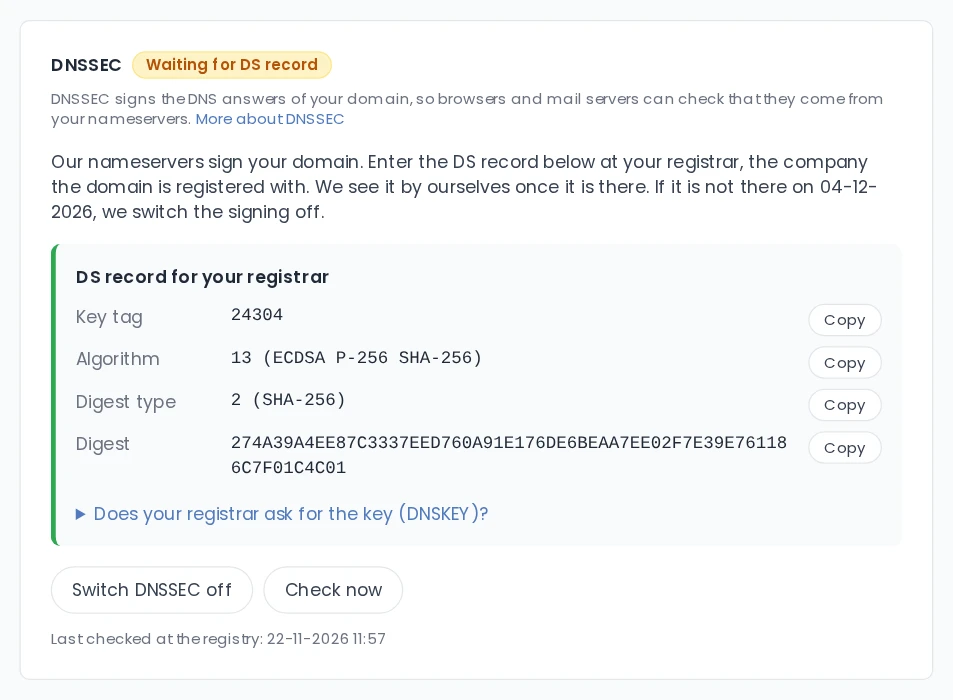
Log in at your registrar and look for DNSSEC or DS records on your domain. Add a record and paste the four values into the matching fields. Some registrars ask for the key itself instead of the DS record. In that case click Does your registrar ask for the key (DNSKEY)? on the card and use the flags (257), the protocol (3), the algorithm (13) and the public key shown there.
If the panel of your registrar has no place for DNSSEC, send the values to their support. Most registrars then place the record for you.
Step 3: we check it for you
At least every hour we look at the registry to see whether the DS record is there and belongs to our key. To skip the wait, click Check now. Once it matches, the status becomes Active and you get a confirmation by mail. From then on resolvers that check DNSSEC validate every answer for your domain.
The card shows a date, 14 days after you switched DNSSEC on. We send a reminder after 3 and after 10 days. If the record is not there on that date, we switch the signing off and the status returns to Off. You can switch it on again afterwards; you then get a new DS record.
What the statuses mean
- Off: your zone is not signed.
- Switching on: we are creating the keys, the DS record is on the card in a few minutes.
- Waiting for DS record: your zone is signed, the DS record is not at the registry yet.
- Active: the DS record at the registry belongs to our key. DNSSEC works.
- Mismatch: the registry has a DS record that does not belong to our key. Read below what to do.
- Switching off: you switched DNSSEC off and we are waiting for the DS record to disappear.
If the DS record is wrong
With the status Mismatch, resolvers that check DNSSEC refuse the answers for your domain. Part of your visitors cannot open your website and mail can get stuck. We mail you about this straight away, with the right record.
Usually a character was lost while copying, or a DS record from an earlier DNS provider is still there. Replace the record at your registrar with the record on the card and click Check now. Keep in mind that resolvers can remember the old record for a while: an hour for .nl, a day for .be and .com.
Switching DNSSEC off or moving to other nameservers
The order decides whether your domain stays reachable. Always start in the portal:
- Click Switch DNSSEC off on the card. The status becomes Switching off and you get a mail.
- Remove the DS record at your registrar.
- We keep signing your zone until the record is gone at the registry and resolvers have forgotten it. Then we switch the signing off and you get a confirmation.
If you are moving to the nameservers of another party, do this first and change your nameservers only when the status is Off. The steps for the change itself are in change your nameservers. Changed your mind before the DS record is gone? Click Keep DNSSEC on: your zone stayed signed all along.
Stuck? Contact support and we will look at it with you.
Frequently asked questions
Where do I find the DS record for my registrar?
In the customer portal on the page of your site, on the DNSSEC card. Once you have switched DNSSEC on it shows the key tag, the algorithm, the digest type and the digest, each with a copy button. You receive the same values by mail.
My registrar asks for a DNSKEY instead of a DS record. What do I enter?
On the DNSSEC card, click the line Does your registrar ask for the key (DNSKEY)?. It shows the flags (257), the protocol (3), the algorithm (13) and the public key. The registry derives the DS record from those.
How long do I have to add the DS record?
14 days after you switched DNSSEC on. You get a reminder by mail after 3 and after 10 days. If the record is still missing then, we switch the signing off. Your website and email keep working all that time, and you can switch DNSSEC on again afterwards.
Does my website still work while I wait for the DS record?
Yes. Without a DS record at the registry no resolver checks the signatures, so nothing changes for your visitors. DNSSEC protects your domain from the moment the status is Active.
What do I do when the status is Mismatch?
Then the registry has a DS record that does not belong to the key of our nameservers. Replace it at your registrar with the record on the card and click Check now. Resolvers can remember the old record for an hour (.nl) up to a day (.be, .com).
Will I ever have to replace the DS record?
Our nameservers keep the same key, so the record stays valid for as long as you use our nameservers. If your zone does get a new key, we mail you the new DS record straight away and it is on the card.